Exploring Vidya AI
A Unified School Management Platform Built for Every Stakeholder
Managing a modern educational institution is no longer just about classrooms and report cards. Schools today require seamless coordination between administrators, teachers, parents, and students while ensuring transparency, efficiency, and data-driven decision-making.
The Vidya School Management Platform demonstrates how a single digital ecosystem can connect all these stakeholders through dedicated dashboards and role-specific features. Instead of offering a one-size-fits-all interface, it tailors the experience based on who is using the platform, making school operations more organized and accessible.
A Common Foundation with Personalized Experiences
Across all user roles, the platform maintains a consistent and intuitive interface. The left navigation panel organizes modules such as Academics, Daily Operations, Communication, and Finance & Administration, while the top navigation allows seamless switching between Admin, Teacher, Parent, and Student views.
At the center of the dashboard is an AI-powered Report Card section that provides visual analytics including class averages, improving and declining students, weakest subjects, grade distributions, and subject-wise performance.
Administrator Dashboard: The Command Center
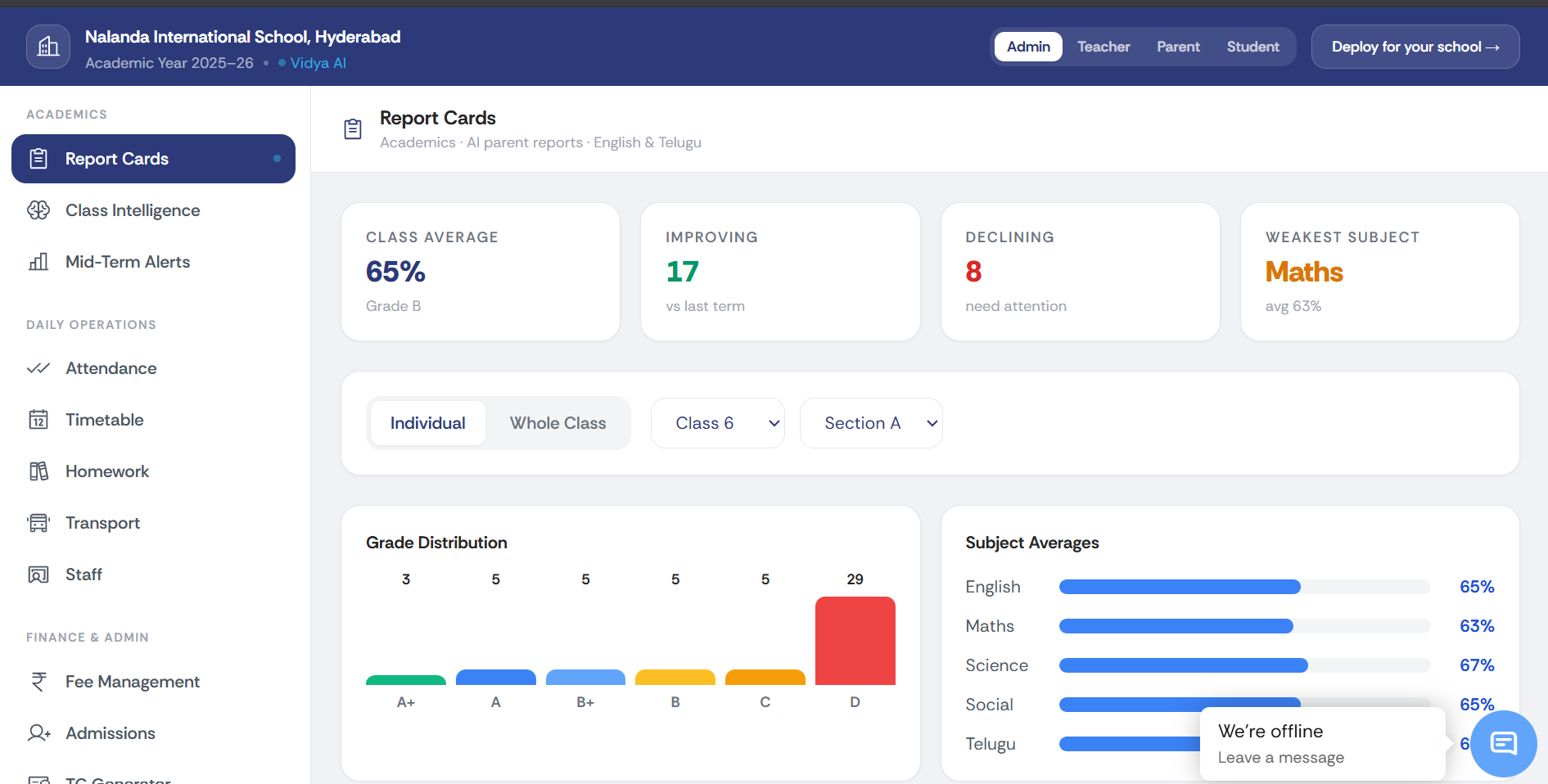
Figure 1: Administrator dashboard providing institution-wide academic insights and operational controls.
The Administrator dashboard acts as the operational backbone of the institution. It provides access to virtually every aspect of school management, including:
Academic report cards and performance analytics
Class intelligence and trend analysis
Mid-term alerts for proactive intervention
Attendance monitoring
Timetable management
Homework administration
Transport management
Staff management
Fee management
Admissions processing
Administrative communication modules
What makes this view particularly valuable is its ability to consolidate multiple datasets into actionable insights. Summary cards instantly display metrics such as class averages, improving students, declining students, and weakest-performing subjects, allowing administrators to identify areas requiring attention without manually reviewing reports.
Teacher Dashboard: Empowering Classroom Management
Teachers require quick access to academic information rather than administrative controls. The Teacher dashboard is designed with this philosophy in mind.
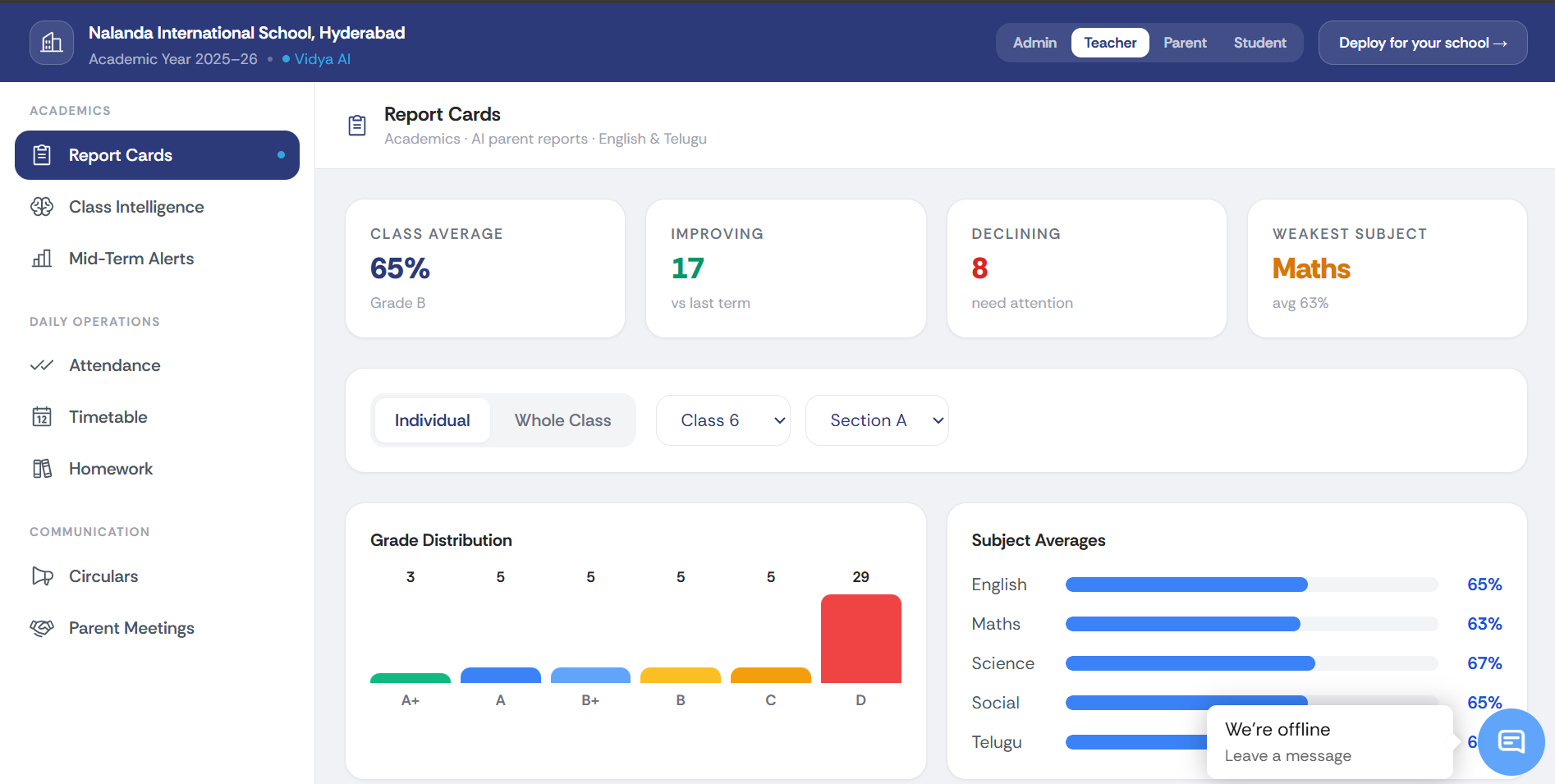
Figure 2: Teacher interface focused on classroom performance monitoring and student assessment.
From this interface, teachers can:
Review report cards for individual students or entire classes
Switch between class sections using dropdown filters
Analyze grade distributions
View subject-wise averages
Track academic improvements and declines
Monitor attendance and homework assignments
Access communication features such as circulars and parent meetings
The dashboard presents performance metrics visually through charts and progress bars, making it easier to identify students who require additional academic support.
Parent Dashboard: Transparent Academic Visibility
Parents often struggle to stay updated with their child's academic progress beyond periodic report cards. The Parent dashboard bridges this communication gap by providing continuous access to performance indicators.
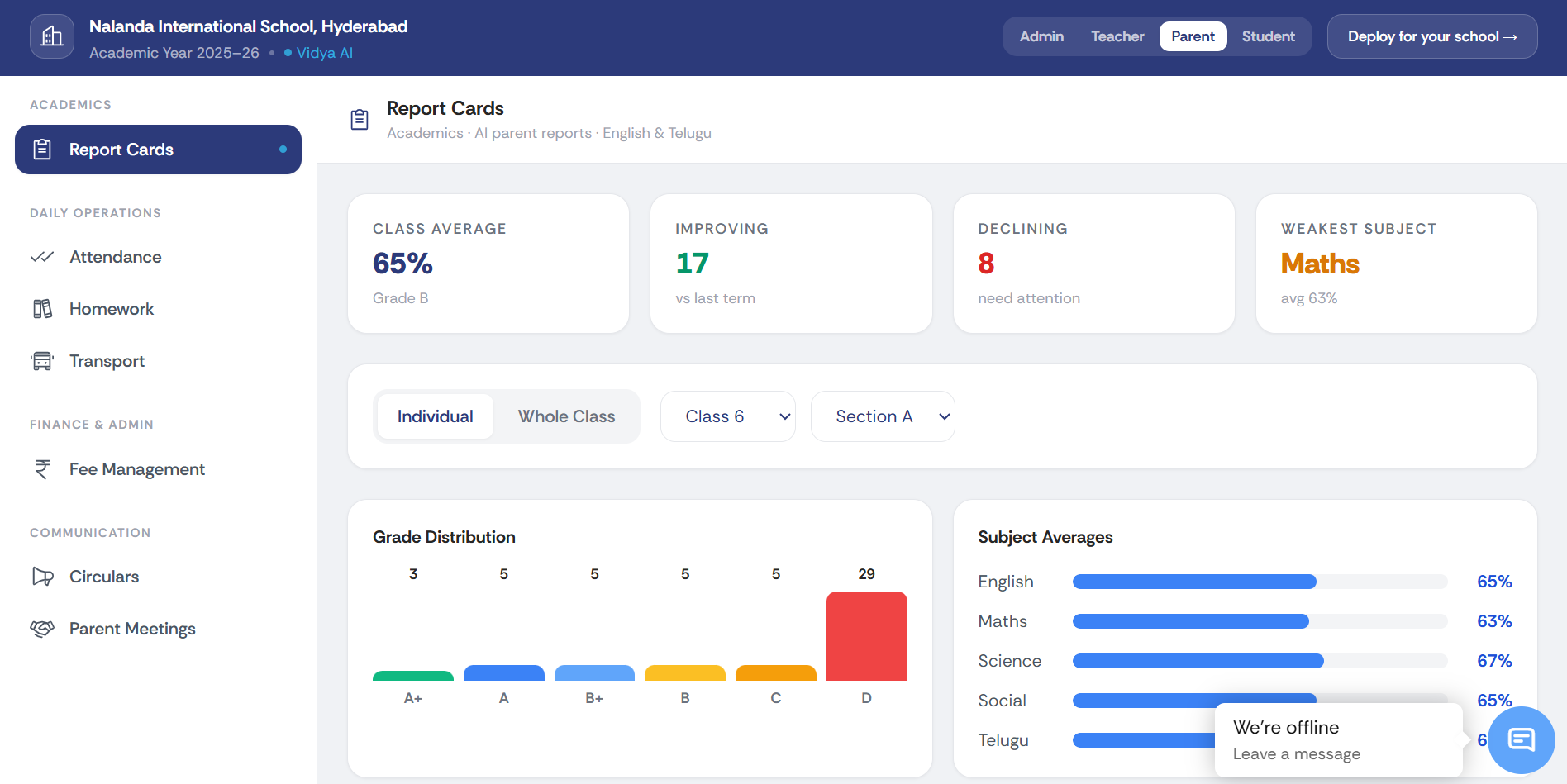
Figure 3: Parent portal providing transparent access to student performance and school updates.
The parent experience includes:
Student report cards
Attendance information
Homework tracking
Transport updates
Fee management
School circulars
Parent meeting information
Subject-wise academic performance
Overall class averages
Instead of relying solely on end-of-term reports, parents gain ongoing visibility into their child's educational journey, enabling more informed engagement with teachers and school administration.
Student Dashboard: Learning Through Self-Awareness
For students, the platform shifts focus from administration to self-improvement.
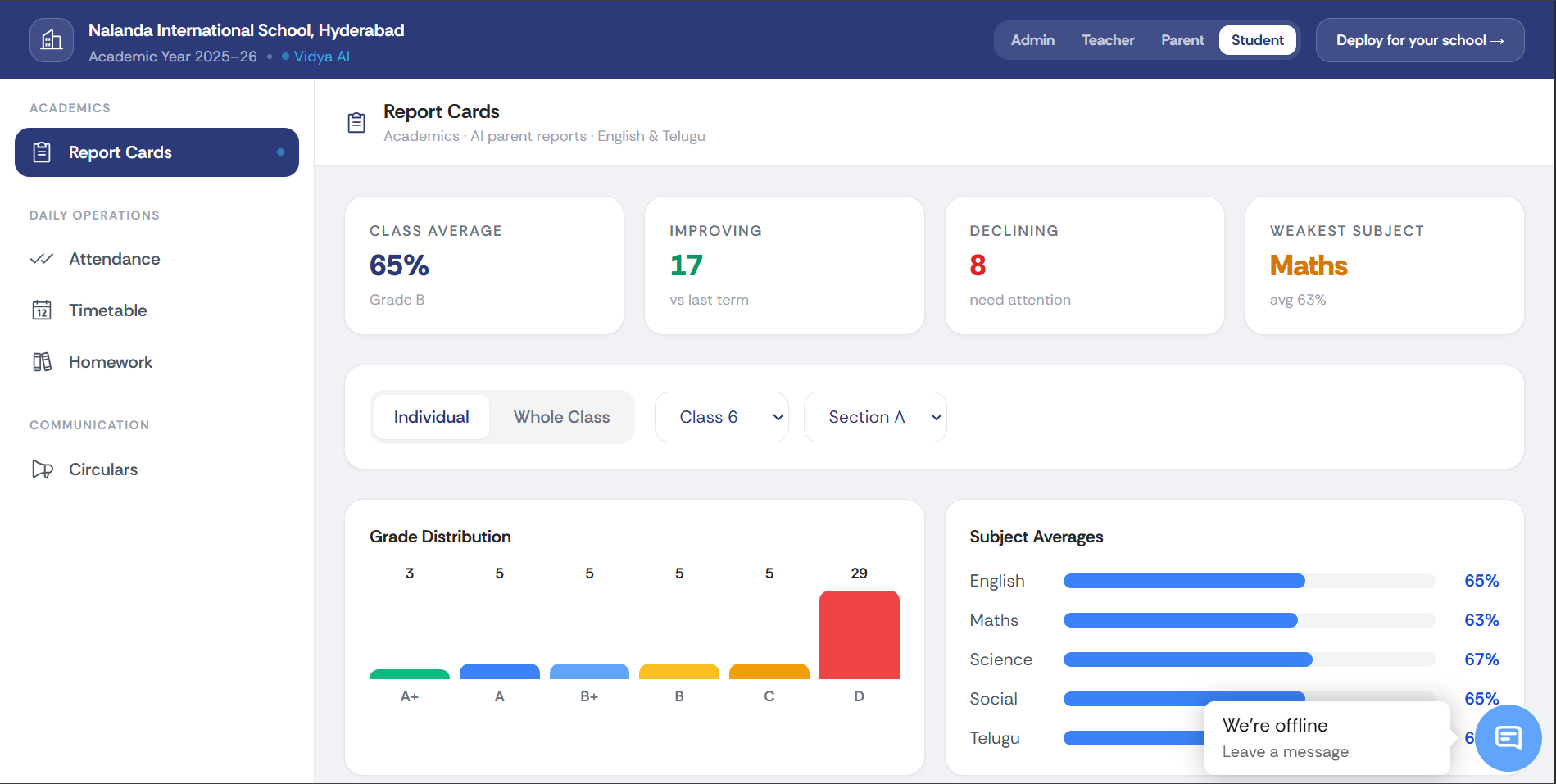
Figure 4: Student dashboard enabling learners to monitor their academic progress independently.
Students can use the dashboard to:
Access report cards
View attendance records
Check homework assignments
Monitor timetables
Stay informed through school circulars
Track subject-wise performance
Compare strengths and weaknesses across subjects
Visual representations of grades and subject averages encourage students to take ownership of their learning and identify areas that need improvement.
AI-Driven Academic Intelligence
One of the standout aspects of the platform is its emphasis on analytics rather than static records.
Key performance indicators include:
Class Average: A quick overview of overall class performance.
Improving Students: Identifies learners showing positive academic trends.
Declining Students: Highlights students who may require intervention.
Weakest Subject: Pinpoints subjects needing additional focus.
Grade Distribution: Displays how grades are spread across the class.
Subject Averages: Offers a comparative view of performance across different subjects.
These visual insights help educators and administrators make proactive, data-informed decisions instead of relying solely on manual analysis.
A Unified Ecosystem for School Operations
Beyond academics, the platform integrates operational modules such as attendance management, transport coordination, homework tracking, communication channels, admissions, fee management, and staff administration into a single system.
This centralized approach minimizes paperwork, reduces duplication, and streamlines collaboration among all stakeholders.
Conclusion
The Vidya School Management Platform illustrates how technology can simplify educational administration while improving transparency and collaboration. By providing dedicated dashboards for administrators, teachers, parents, and students, it ensures that each user receives relevant information without unnecessary complexity.
Its combination of role-based interfaces, visual analytics, operational modules, and AI-powered insights demonstrates how modern digital infrastructure can support better decision-making and create a more connected educational ecosystem.
Rather than replacing human involvement, the platform enhances it—giving administrators clearer oversight, teachers better classroom intelligence, parents greater visibility, and students the tools to actively participate in their own academic growth.
Want us to build this for your team?
We design and ship enterprise AI systems — from architecture to production. Book a 30-minute call and we'll map out exactly how it fits your stack.
About the Author
Lohith Reddy
Related Articles
Why We Built an AI That Refuses to Act Without You
A walkthrough of the Zero-Drift framework: Three autonomous agents, One human gate, and why that's the only way enterprise AI can actually ship.
Mitigating Training–Serving Skew Using Enterprise Feature Stores
Building a Single Source of Truth for Production ML Features
Tokenomics: Why Enterprise AI Budgets Broke in 2026, and the Discipline That Fixes It
How "tokenmaxxing" quietly became the biggest budget risk in enterprise technology, and what CFOs and CTOs need to do about it now.